
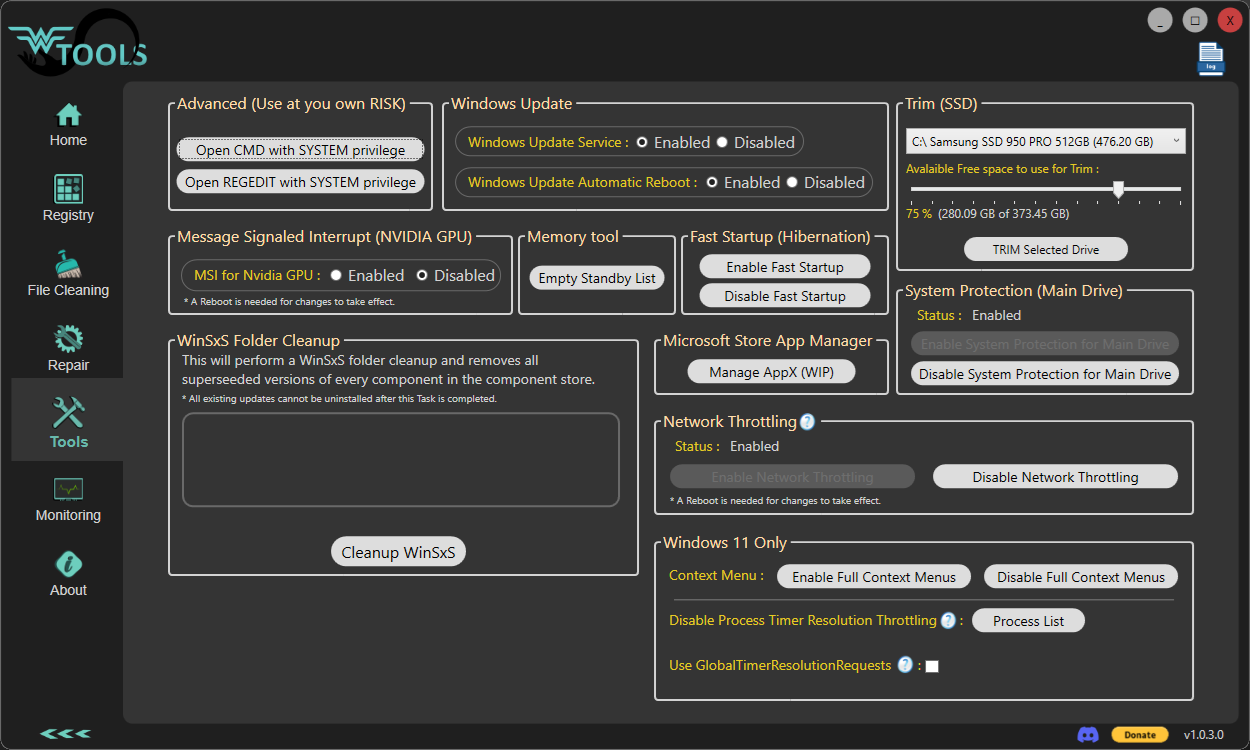
Wagnardsoft Tools (WTools) V1.0.8.2 Released.

User avatar
Wagnard
Site Admin
Posts: 2034
Joined: Sat Jul 04, 2015 5:18 pm
Location: 127.0.0.1

Wagnardsoft Tools (WTools) V1.0.8.2 Released.

Post by Wagnard »

Wagnardsoft Tools (WTools) V1.0.8.2 Released.

Image

Requirement:
-Windows 7* SP1+ *Note, some feature like DPC Latency won't work
* Windows 7 SP1 is supported with Extended Security Updates installed.

What is WTools:
- Clean unused Registry keys.
- Remove temporary Files from Windows, Current user and Browsers to free some space.
- Repair Windows corrupted system files.
- Enable / Disable MSI (Message Signaled Interrupts) for Nvidia cards pre RTX3xxx (will support all PCI device in future update)
- SSD Trimming with custom size.
- Opening a command prompt (CMD.exe) and REGEDIT with SYSTEM privilege for advance file / registry manipulation.
- and more.

*** WARNING ***
Use at your own RISK.
WTools should not delete important Registry keys, Backup option is for extra safety.

Changelog:
- DPC monitoring real-time bars.
- VRAM tab various fixes.
- Added in tools, Microsoft Edge Uninstall unlock.
- Added Disable Multi-Plane Overlay (MPO) in 'Tools' tab.
- Added Disable Nagle's algorithm in 'Optimize' tab.
- Fixed hibernation / fastboot detection


Known issues:
- Registry backup is not working.

WTools - Official Download

Installer Version

SHA-256: CC228B4B91337B46E614B388835C120288C2FF236565908F941AC5E2F4AE4B2B
Download WTools (Installer)

---

Portable Version

SHA-256: 0E2E246700D4BDE9DB2E249329B76FEB3A5F36725DABC3DCBBED153E1374461C
Download WTools (Portable)

Social :
Image Image Image Image

Here is an application from one of my partners that we recommend.
It is a useful tool that may help you update outdated drivers.

Image

Enjoy our free tools?
Leave a tip to support development:

🛍️ Visit our Merch Shop
(Best way to support us)

💙 Tip via PayPal

💳 Tip with Card
(Visa / MasterCard / UnionPay - Processed securely by Stripe)

Or
Bitcoin : bc1q5qqjq97c33r46agjareeqjjaf865x6zmtekhzx
Support us over our PATREON page.
User avatar
Spartan
Posts: 17
Joined: Sat Mar 28, 2020 10:02 am
Location: Dubai

Re: Wagnardsoft Tools (WTools) V1.0.8.2 Released.

Post by Spartan »

I want to report a bug.

I am on Windows 11 25H2 (Build 26200.8737)

These are my laptop specs:

ASUS ROG Strix SCAR 16 G635LX | Intel Core Ultra 9 275HX | SK Hynix 64GB DDR5-5600 MHz RAM | GeForce RTX 5090 | BOE NE160QDM-NM8 16" QHD+ 240 Hz Mini LED Display + ASUS ROG Strix OLED XG27AQWMG QHD 280 Hz 27" Monitor | 2x WD_BLACK SN850X 8TB SSDs (RAID 0) | Intel Wi-Fi 7 BE200 WLAN | Windows 11 Pro

I have two Sandisk Extreme Portable SSDs as well that are formatted in exFAT which as you may know, Windows does not support TRIM on that file format.

so I ran Wagnard Tools and noticed there is a TRIM option. I trimmed my Drive C: and D: just fine which are my local SSDs but when I tried Trimming the external drive the whole application froze then Windows explorer froze. End Task didn't work, I had to force shutdown as it completely crashed my system.
User avatar
Wagnard
Site Admin
Posts: 2034
Joined: Sat Jul 04, 2015 5:18 pm
Location: 127.0.0.1

Re: Wagnardsoft Tools (WTools) V1.0.8.2 Released.

Post by Wagnard »

Spartan wrote: Wed Jul 01, 2026 2:38 am I want to report a bug.

I am on Windows 11 25H2 (Build 26200.8737)

These are my laptop specs:

ASUS ROG Strix SCAR 16 G635LX | Intel Core Ultra 9 275HX | SK Hynix 64GB DDR5-5600 MHz RAM | GeForce RTX 5090 | BOE NE160QDM-NM8 16" QHD+ 240 Hz Mini LED Display + ASUS ROG Strix OLED XG27AQWMG QHD 280 Hz 27" Monitor | 2x WD_BLACK SN850X 8TB SSDs (RAID 0) | Intel Wi-Fi 7 BE200 WLAN | Windows 11 Pro

I have two Sandisk Extreme Portable SSDs as well that are formatted in exFAT which as you may know, Windows does not support TRIM on that file format.

so I ran Wagnard Tools and noticed there is a TRIM option. I trimmed my Drive C: and D: just fine which are my local SSDs but when I tried Trimming the external drive the whole application froze then Windows explorer froze. End Task didn't work, I had to force shutdown as it completely crashed my system.
Noted, I'll check that.
Thanks for reporting and sorry for the annoyances it caused.

Edit: Fixed for the next version.